

How to set up PDF generation as a service task
Overview
The app can generate PDFs as a standard service task that you add as a step in the process.
Previously, this functionality was not in a service task but was built into the general code for changing process steps. If you set up the app before version 8.9, you should disable the functionality that runs outside the process definition.
You do this by turning off “enablePdfGeneration” on all data types.
Benefits of migrating to a service task:
- You can retry if PDF generation fails, without running “process next” again. This avoids unintended side effects.
- You can create multiple PDFs from one task, or combine multiple tasks into one PDF.
- In the future, PDF generation can run as a background job with automatic retries and better scaling.
Setup
You can use the Arbeidsflyt tab in Altinn Studio to add a PDF service task.
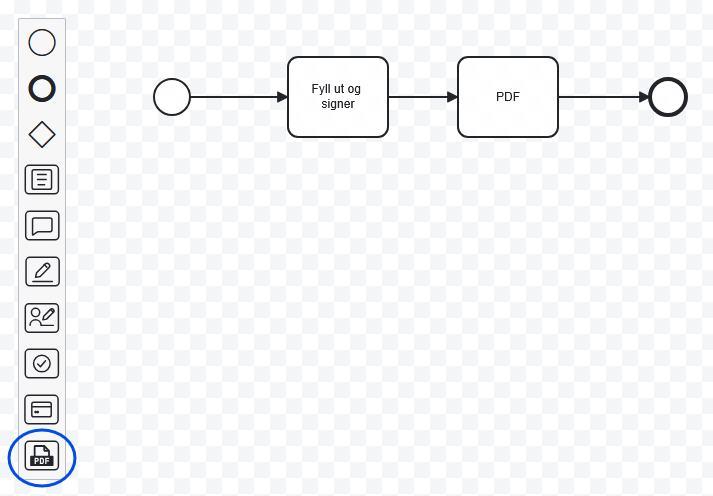
Drag and drop the PDF service task to where in the process you want to generate a PDF, often right after a data task.
Once you have placed the task, a configuration panel opens on the right side of the screen. There you choose between two approaches: standard or custom PDF.
If you select this option, you specify which previous tasks should be included in the PDF. The content is based on the components in the selected tasks, displayed in summary mode. This function does not respect the pdfLayoutName configuration in Settings.json.
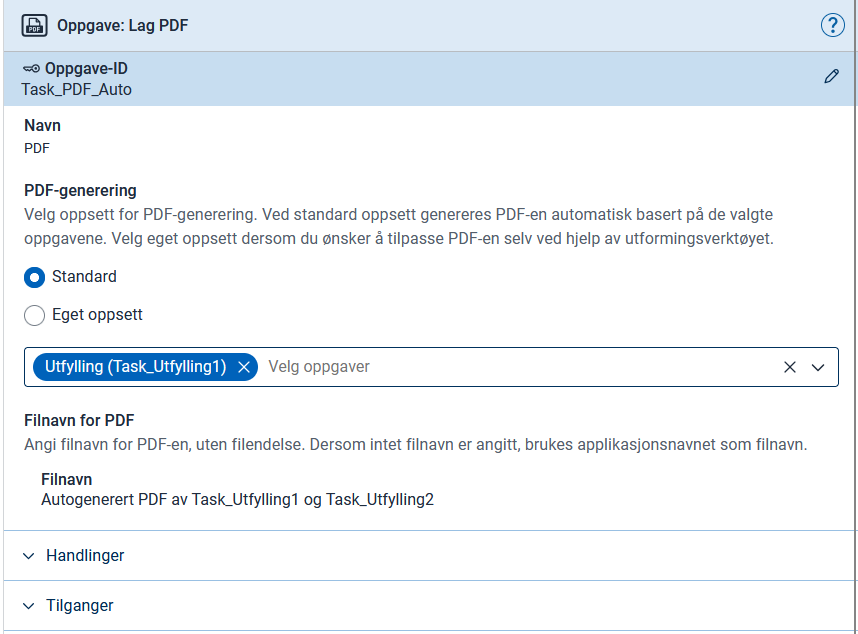
Altinn Studio inserts a service task into process.bpmn. The result may differ slightly from the example below.
App/config/process/process.bpmn<bpmn:serviceTask id="Pdf" name="PDF">
<bpmn:extensionElements>
<altinn:taskExtension>
<altinn:taskType>pdf</altinn:taskType>
<altinn:actions>
<altinn:action>reject</altinn:action> <!-- Added using "Handlinger", if the user should be able, for instance, go backwards in the process. -->
</altinn:actions>
<altinn:pdfConfig>
<altinn:filenameTextResourceKey>pdfFileName</altinn:filenameTextResourceKey>
<altinn:autoPdfTaskIds>
<altinn:taskId>Task_Utfylling1</altinn:taskId>
</altinn:autoPdfTaskIds>
</altinn:pdfConfig>
</altinn:taskExtension>
</bpmn:extensionElements>
<bpmn:incoming>Flow_0er70tq</bpmn:incoming>
<bpmn:outgoing>Flow_19ikt1z</bpmn:outgoing>
</bpmn:serviceTask>
If you select this option, you can determine the content of the PDF yourself by defining your own layout set for the PDF service task.
You first provide a name for the layout set and then choose a data model as the default model for the set. You can, for example, choose the model of one of the tasks included in the PDF.
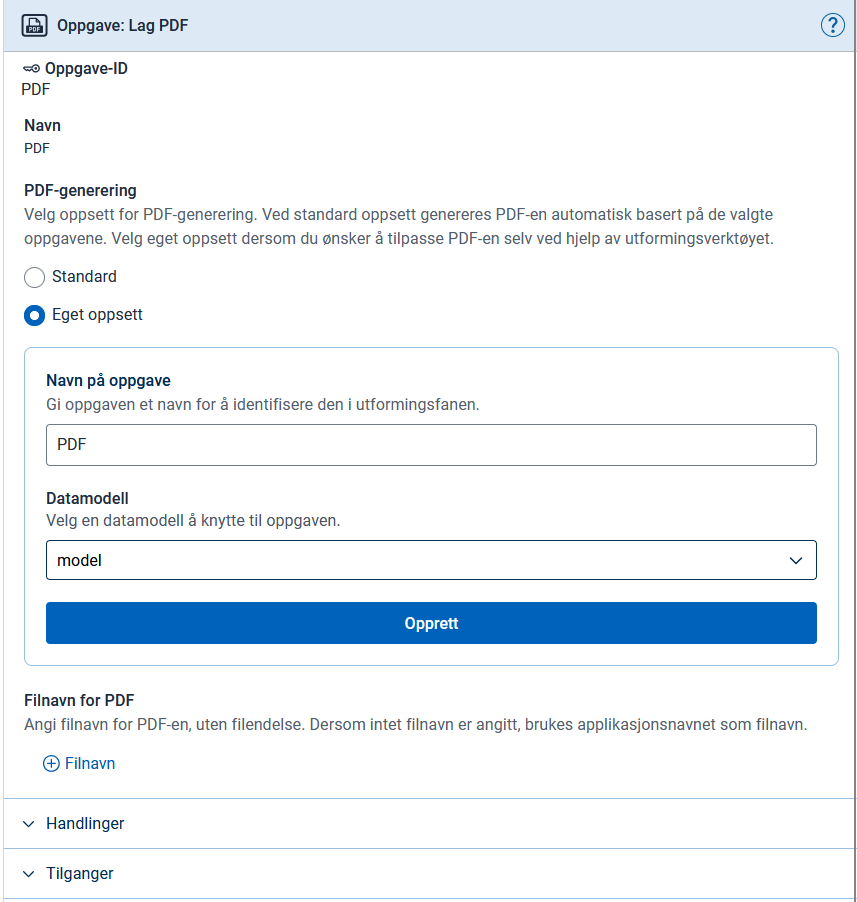
Altinn Studio inserts a service task into process.bpmn and generates the layout-set files, but without content in PdfLayout.json.
App/config/process/process.bpmn<bpmn:serviceTask id="Pdf" name="PDF">
<bpmn:extensionElements>
<altinn:taskExtension>
<altinn:taskType>pdf</altinn:taskType>
<altinn:actions>
<altinn:action>reject</altinn:action> <!-- Added using "Handlinger", if the user should be able, for instance, go backwards in the process. -->
</altinn:actions>
<altinn:pdfConfig>
<altinn:filenameTextResourceKey>pdfFileName</altinn:filenameTextResourceKey>
</altinn:pdfConfig>
</altinn:taskExtension>
</bpmn:extensionElements>
<bpmn:incoming>SequenceFlow_0c458hu</bpmn:incoming>
<bpmn:outgoing>SequenceFlow_5assd2s</bpmn:outgoing>
</bpmn:serviceTask>
Layout-set
The PDF service task needs its own layout set to define the content. If you use the Arbeidsflyt-editor, Altinn Studio generates this automatically. You then only need to edit the content in PdfLayout.json.
The files and folder structure should look approximately like this:
App/ui/
├── layout-sets.json
├── form/
│   ├── Settings.json
│   └── layouts/
│       └── ...
└── Pdf/
    ├── Settings.json
    └── layouts/
        ├── PdfLayout.json
        └── ServiceTask.json
layout-sets.json
App/ui/layout-sets.json{
"$schema": "https://altinncdn.no/toolkits/altinn-app-frontend/4/schemas/json/layout/layout-sets.schema.v1.json",
"sets": [
{
"id": "form",
"dataType": "model",
"tasks": [
"Task_Utfylling1"
]
},
{
"id": "Pdf",
"dataType": "model",
"tasks": [
"Pdf"
]
}
],
"uiSettings": {
"taskNavigation": [
{
"taskId": "Task_Utfylling1",
"name": "Utfylling"
},
{
"type": "receipt"
}
]
}
}
Settings.json
App/ui/Pdf/Settings.json{
"$schema": "https://altinncdn.no/schemas/json/layout/layoutSettings.schema.v1.json",
"pages": {
"pdfLayoutName": "PdfLayout",
"order": [
"ServiceTask"
]
}
}
PdfLayout.json
In this file, you define the content of the PDF. You typically use the Summary2 component, either against individual components or against entire pages and layout sets.
App/ui/Pdf/layouts/PdfLayout.json{
"$schema": "https://altinncdn.no/toolkits/altinn-app-frontend/4/schemas/json/layout/layout.schema.v1.json",
"data": {
"layout": [
{
"id": "InstanceInformation",
"type": "InstanceInformation"
},
{
"id": "SummaryTaskUtfylling1",
"type": "Summary2",
"target": {
"type": "layoutSet",
"taskId": "Task_Utfylling1"
}
}
]
}
}
ServiceTask.json
This layout file shows content to the user if PDF generation fails, such as error messages or instructions. Feel free to customise.
If you want to allow the user to abort the service task, for example to go back to the previous task, you must add the reject action to the process definition (see the XML examples above) and grant rights to the action in the app’s access policy. Where the user is redirected depends on the sequence flows in the BPMN process.
App/ui/Pdf/layouts/ServiceTask.json{
"$schema": "https://altinncdn.no/schemas/json/layout/layout.schema.v1.json",
"data": {
"layout": [
{
"size": "L",
"id": "service-task-title",
"type": "Header",
"textResourceBindings": {
"title": "service_task_custom_pdf_default.title"
}
},
{
"id": "service-task-body",
"type": "Paragraph",
"textResourceBindings": {
"title": "service_task_custom_pdf_default.body"
}
},
{
"id": "service-task-help-text",
"type": "Paragraph",
"textResourceBindings": {
"title": "service_task_custom_pdf_default.help_text"
}
},
{
"id": "service-task-button-group",
"type": "ButtonGroup",
"children": [
"service-task-retry-button",
"service-task-back-button"
]
},
{
"id": "service-task-retry-button",
"type": "Button",
"textResourceBindings": {
"title": "service_task_custom_pdf_default.retry_button"
}
},
{
"id": "service-task-back-button",
"type": "ActionButton",
"textResourceBindings": {
"title": "service_task_custom_pdf_default.back_button"
},
"action": "reject",
"buttonStyle": "secondary"
}
]
}
}
Filename
Including <altinn:filenameTextResourceKey> is optional. Here you specify a text resource key to use as the filename, with support for languages and variables. If you omit it, the PDF uses the application name as the filename.
{
  "id": "pdfFileName",
  "value": "My filename {0}",
  "variables": [
    {
      "key": "DataModelFieldName",
      "dataSource": "dataModel.model"
    }
  ]
}
dataModel.default. You must use the actual ID of the data model, e.g. dataModel.model.Testing
Fill out the form and proceed. When you reach the PDF service task in the workflow, the app generates the PDF and automatically proceeds to the next step in the process, for example the receipt.
Troubleshooting
If you get an error message that the service task failed during PDF generation, you can open the form in the app and add the query parameter pdf=1. You will then see the same content the PDF should have displayed, and any error messages.