

Guardianship
Altinn Authorisation makes it easy for service owners to add support for guardianship in their services.
People who cannot look after their own interests due to injury, illness or disability can receive help from a guardian. Such an arrangement is voluntary and tailored to the wishes and needs of the person under guardianship. The County Governor appoints and supervises guardians, and the Civil Affairs Authority (Sivilrettsforvaltningen) is the central guardianship authority.
How to add support for guardianship
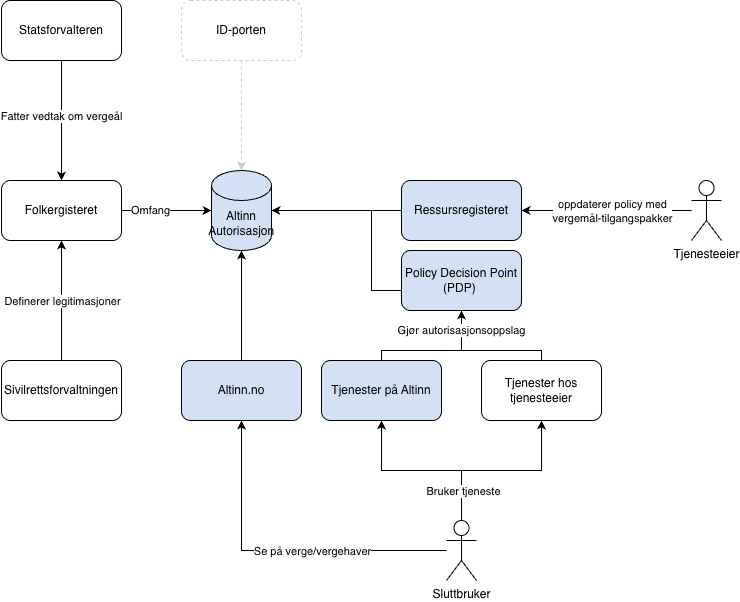
The Civil Affairs Authority defines the guardianship powers that specify what a guardian can do on behalf of a ward. The guardianship powers are retrieved from the National Population Register and linked to access packages in Altinn Authorisation — you as a service owner do not need to manage this.
As a service owner, you do three things:
- Create access rules that link the relevant guardianship powers to your service.
- Add a party selector so the guardian can choose who they represent.
- Perform an authorisation lookup to confirm the guardian has the correct guardianship power.
Once this is in place, the guardian can log in, choose to represent the ward and perform actions in the service.
The National Population Register is the authoritative source for guardianship powers. It is not possible to grant or revoke guardianship powers in Altinn — this is done via the County Governor.
See the step-by-step guide for adding guardianship support.
What it looks like for end users
When a guardian logs into a service that supports guardianship, all wards they are guardian for are displayed — limited to the guardianship powers the service supports. The guardian selects a ward from the party selector and can then perform actions on behalf of that ward.
In the access management interface in Altinn, the ward can see their guardians, and guardians can see the people they are guardians for. If a ward has multiple guardians, all are displayed, but the specific areas each guardian is responsible for are not shown.